
🧣 Spline#
#bs.spline:help
Create and manipulate smooth curves from control points.

“Do not go where the path may lead, go instead where there is no path and leave a trail.”
—Ralph Waldo Emerson
Supported Dimensions
These functions support only 1D, 2D, and 3D splines. If you need to handle more dimensions, you can run multiple 1D splines in parallel for each axis or component.
Variable Number of Points
All spline functions in this module accept a variable number of points. You are not restricted to using just four or any fixed count. Splines are built by combining multiple curve segments, so you can define as many points as needed.
🔧 Functions#
You can find below all functions available in this module.
Evaluate#
- #bs.spline:evaluate_bezier
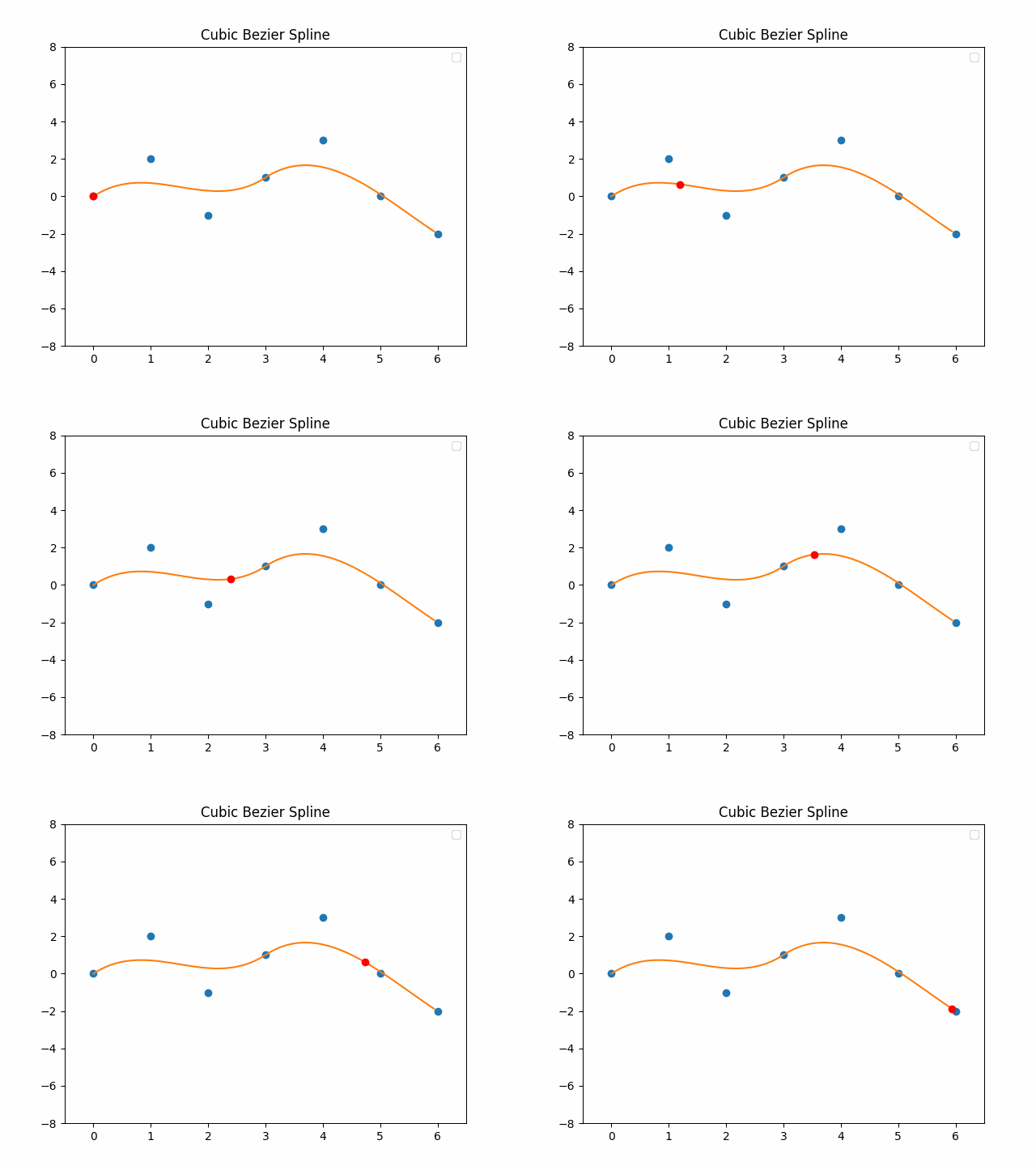
Evaluate a Bézier spline composed of one or more segments. Each segment is defined by four consecutive control points, with the last point of a segment reused as the first of the next.
- Inputs:
Storage
bs:in spline.evaluate_bezier:Arguments
points: A list of coordinates (1D, 2D, or 3D). Every group of 4 consecutive points defines one segment.
time: A normalized position between 0 and the number of segments. Each integer step moves to the next segment, and the fractional part represents interpolation within that segment.
- Outputs:
Storage
bs:out spline.evaluate_bezier: The interpolated point (1D, 2D, or 3D) on the spline at the given time.
Example: Evaluate the point in the middle of a Bézier curve in 2D space (visualize the curve):
data modify storage bs:in spline.evaluate_bezier set value {points:[[0,0],[1,2],[2,-1],[3,1]],time:0.5}
function #bs.spline:evaluate_bezier
data get storage bs:out spline.evaluate_bezier
- #bs.spline:evaluate_bspline
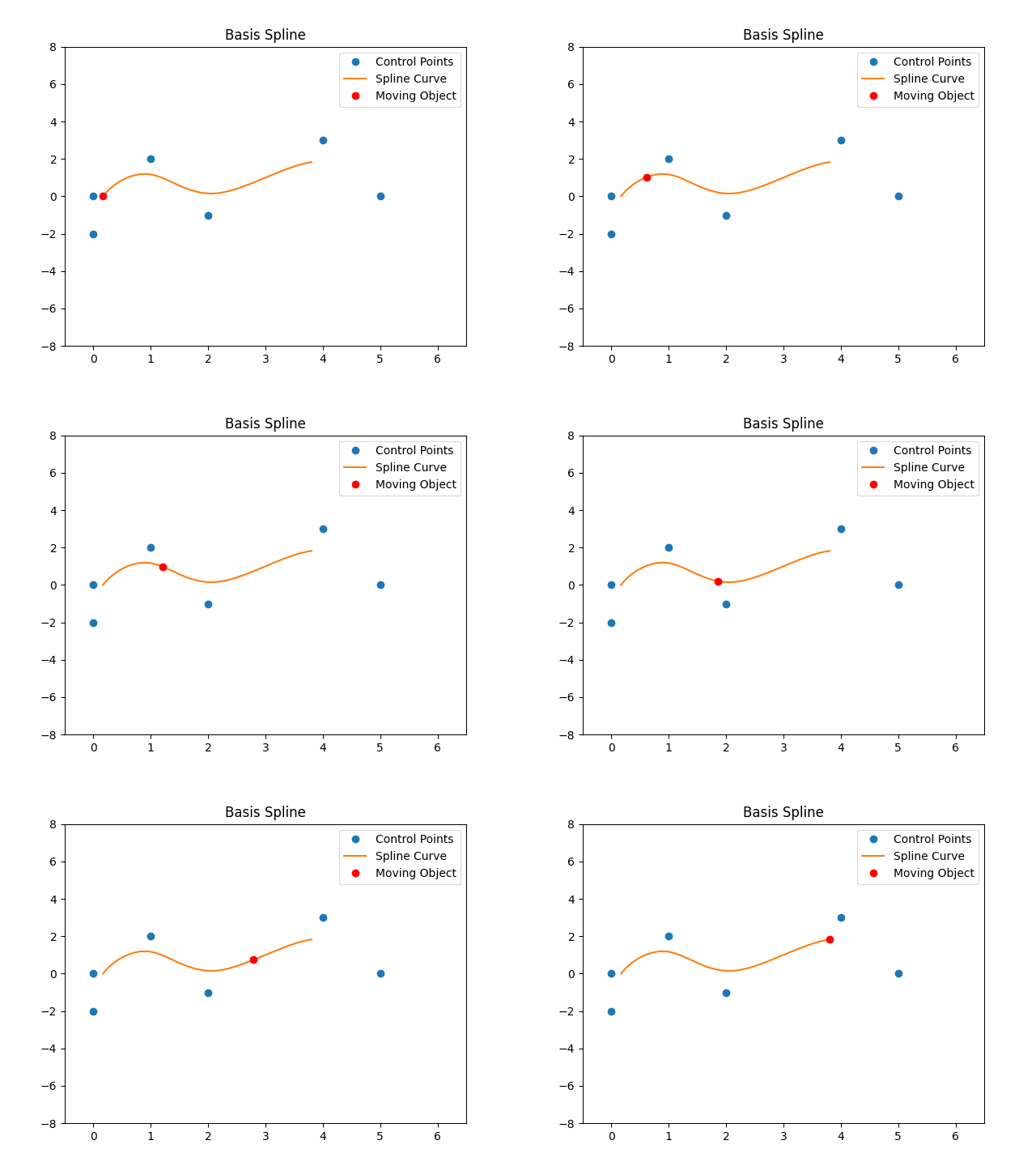
Evaluate a B-spline composed of one or more segments. Each segment is defined by four consecutive control points, with three points of a segment reused in the next to ensure smooth blending.
- Inputs:
Storage
bs:in spline.evaluate_bspline:Arguments
points: A list of coordinates (1D, 2D, or 3D). Every group of 4 consecutive points defines one segment.
time: A normalized position between 0 and the number of segments. Each integer step moves to the next segment, and the fractional part represents interpolation within that segment.
- Outputs:
Storage
bs:out spline.evaluate_bspline: The interpolated point (1D, 2D, or 3D) on the spline at the given time.
Example: Evaluate the point in the middle of a B-Spline curve in 2D space (visualize the curve):
data modify storage bs:in spline.evaluate_bspline set value {points:[[0,0],[1,2],[2,-1],[3,1]],time:0.5}
function #bs.spline:evaluate_bspline
data get storage bs:out spline.evaluate_bspline
- #bs.spline:evaluate_catmull_rom
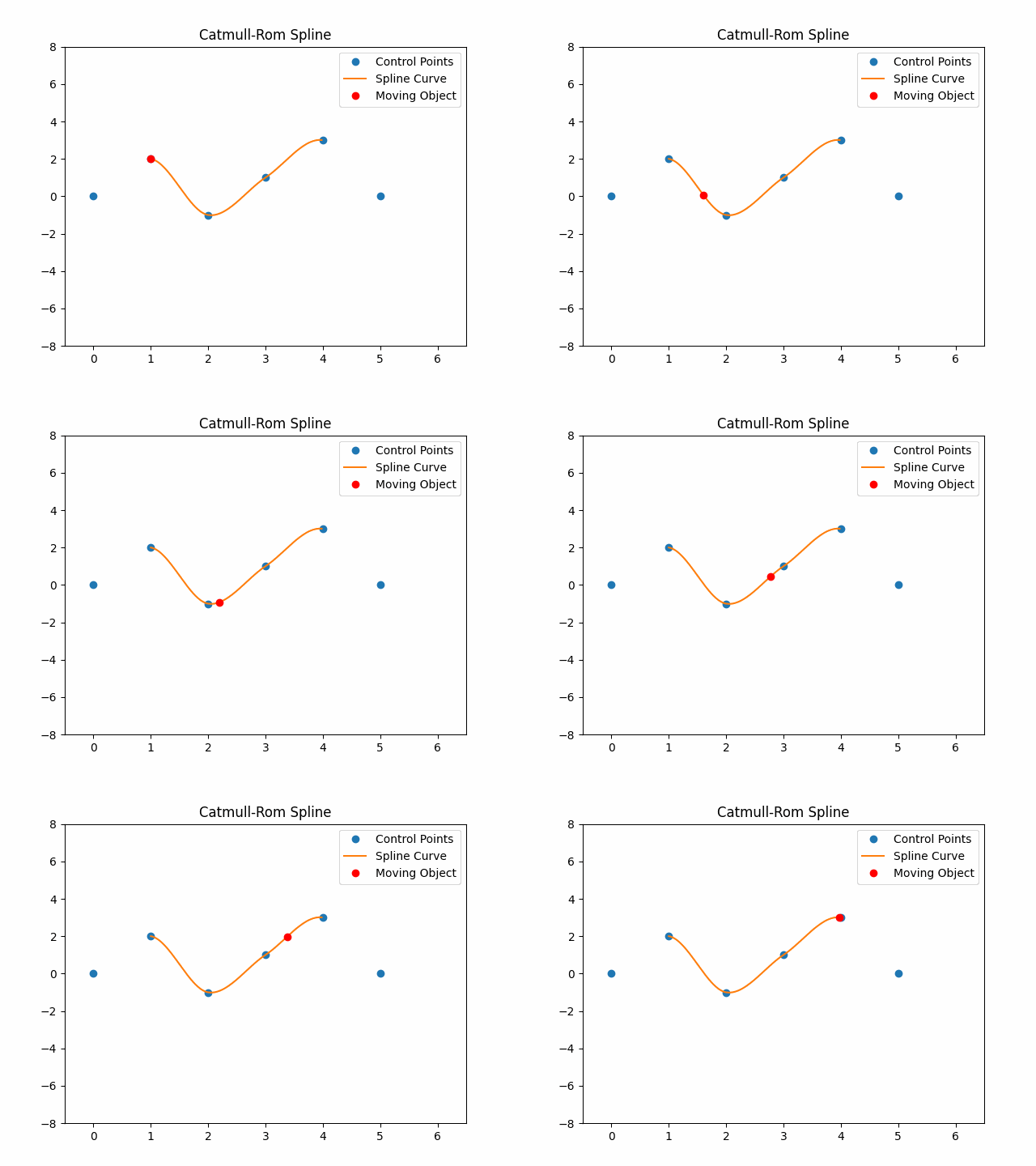
Evaluate a Catmull-Rom spline composed of one or more segments. Each segment is defined by four consecutive control points, with three points of a segment reused in the next to ensure smooth blending.
- Inputs:
Storage
bs:in spline.evaluate_catmull_rom:Arguments
points: A list of coordinates (1D, 2D, or 3D). Every group of 4 consecutive points defines one segment.
time: A normalized position between 0 and the number of segments. Each integer step moves to the next segment, and the fractional part represents interpolation within that segment.
- Outputs:
Storage
bs:out spline.evaluate_catmull_rom: The interpolated point (1D, 2D, or 3D) on the spline at the given time.
Example: Evaluate the point in the middle of a Catmull-Rom curve in 2D space (visualize the curve):
data modify storage bs:in spline.evaluate_catmull_rom set value {points:[[0,0],[1,2],[2,-1],[3,1]],time:0.5}
function #bs.spline:evaluate_catmull_rom
data get storage bs:out spline.evaluate_catmull_rom
- #bs.spline:evaluate_hermite
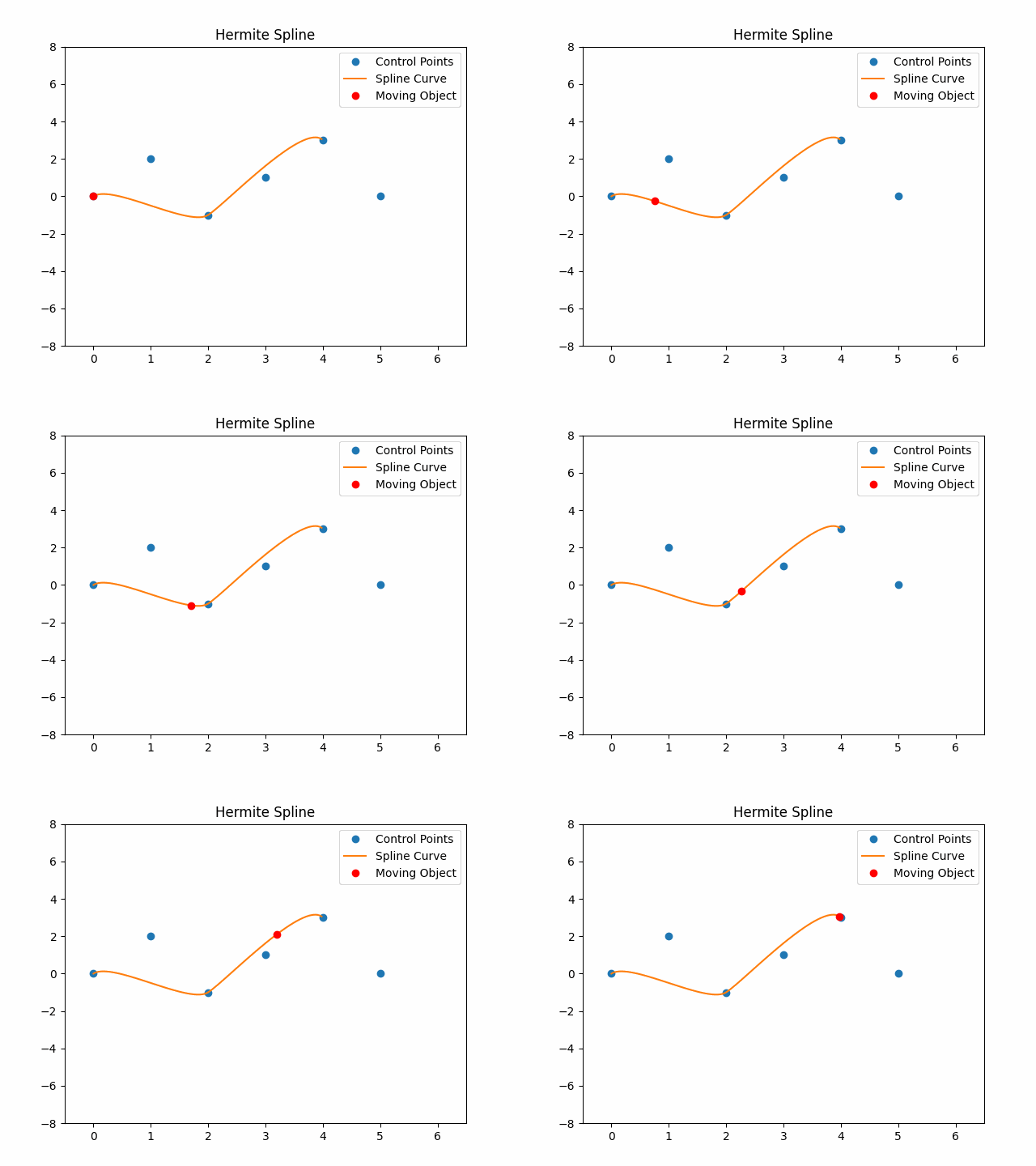
Evaluate a Hermite spline composed of one or more segments. Each segment is defined by two positions and their associated tangents, with two points (the second position and its tangent) reused as the first of the next segment. All coordinates and tangents are absolute.
- Inputs:
Storage
bs:in spline.evaluate_hermite:Arguments
points: A list of coordinates (1D, 2D, or 3D). Every group of 4 consecutive points defines one segment.
time: A normalized position between 0 and the number of segments. Each integer step moves to the next segment, and the fractional part represents interpolation within that segment.
- Outputs:
Storage
bs:out spline.evaluate_hermite: The interpolated point (1D, 2D, or 3D) on the spline at the given time.
Example: Evaluate the point in the middle of a Hermite curve in 2D space (visualize the curve):
data modify storage bs:in spline.evaluate_hermite set value {points:[[0,0],[1,2],[2,-1],[3,1]],time:0.5}
function #bs.spline:evaluate_hermite
data get storage bs:out spline.evaluate_hermite
- #bs.spline:evaluate_linear
Evaluate a linear spline, which connects each pair of consecutive points with a straight segment. There is no curvature; the interpolation is piecewise linear.
- Inputs:
Storage
bs:in spline.evaluate_linear:Arguments
points: A list of coordinates (1D, 2D, or 3D). Each pair of consecutive points defines one linear segment.
time: A normalized position between 0 and the number of segments. Each integer step moves to the next segment, and the fractional part represents interpolation within that segment.
- Outputs:
Storage
bs:out spline.evaluate_linear: The interpolated point (1D, 2D, or 3D) on the spline at the given time.
Example: Evaluate the midpoint between two positions in 2D space:
data modify storage bs:in spline.evaluate_linear set value {points:[[0,0],[4,2],[6,5]],time:0.5}
function #bs.spline:evaluate_linear
data get storage bs:out spline.evaluate_linear
Credits: Aksiome
Sample#
- #bs.spline:sample_bezier
Sample a Bézier spline composed of one or more segments. Each segment is defined by four consecutive control points, with the last point of a segment reused as the first of the next.
- Inputs:
Storage
bs:in spline.sample_bezier:Arguments
points: A list of coordinates (1D, 2D, or 3D). Every group of 4 consecutive points defines one segment.
step: The interval at which the spline is sampled. Smaller values generate more points.
- Outputs:
Storage
bs:out spline.sample_bezier: The sampled points along the spline.
Example: Sample 10 points along a Bézier curve in 2D space (visualize the curve):
data modify storage bs:in spline.sample_bezier set value {points:[[0,0],[1,2],[2,-1],[3,1]],step:0.1}
function #bs.spline:sample_bezier
data get storage bs:out spline.sample_bezier
- #bs.spline:sample_bspline
Sample a B-Spline composed of one or more segments. Each segment is defined by four consecutive control points, with three points of a segment reused in the next to ensure smooth blending.
- Inputs:
Storage
bs:in spline.sample_bspline:Arguments
points: A list of coordinates (1D, 2D, or 3D). Every group of 4 consecutive points defines one segment.
step: The interval at which the spline is sampled. Smaller values generate more points.
- Outputs:
Storage
bs:out spline.sample_bspline: The sampled points along the spline.
Example: Sample 10 points along a B-Spline curve in 2D space (visualize the curve):
data modify storage bs:in spline.sample_bspline set value {points:[[0,0],[1,2],[2,-1],[3,1]],step:0.1}
function #bs.spline:sample_bspline
data get storage bs:out spline.sample_bspline
- #bs.spline:sample_catmull_rom
Sample a Catmull-Rom spline composed of one or more segments. Each segment is defined by four consecutive control points, with three points of a segment reused in the next to ensure smooth blending.
- Inputs:
Storage
bs:in spline.sample_catmull_rom:Arguments
points: A list of coordinates (1D, 2D, or 3D). Every group of 4 consecutive points defines one segment.
step: The interval at which the spline is sampled. Smaller values generate more points.
- Outputs:
Storage
bs:out spline.sample_catmull_rom: The sampled points along the spline.
Example: Sample 10 points along a Catmull-Rom curve in 2D space (visualize the curve):
data modify storage bs:in spline.sample_catmull_rom set value {points:[[0,0],[1,2],[2,-1],[3,1]],step:0.1}
function #bs.spline:sample_catmull_rom
data get storage bs:out spline.sample_catmull_rom
- #bs.spline:sample_hermite
Sample a Hermite spline composed of one or more segments. Each segment is defined by two positions and their associated tangents, with two points (the second position and its tangent) reused as the first of the next segment. All coordinates and tangents are absolute.
- Inputs:
Storage
bs:in spline.sample_hermite:Arguments
points: A list of coordinates (1D, 2D, or 3D). Every group of 4 consecutive points defines one segment.
step: The interval at which the spline is sampled. Smaller values generate more points.
- Outputs:
Storage
bs:out spline.sample_hermite: The sampled points along the spline.
Example: Sample 10 points along a Hermite curve in 2D space (visualize the curve):
data modify storage bs:in spline.sample_hermite set value {points:[[0,0],[1,2],[2,-1],[3,1]],step:0.1}
function #bs.spline:sample_hermite
data get storage bs:out spline.sample_hermite
- #bs.spline:sample_linear
Sample a linear spline, which connects each pair of consecutive points with a straight segment.
- Inputs:
Storage
bs:in spline.sample_linear:Arguments
points: A list of coordinates (1D, 2D, or 3D). Each pair of consecutive points defines one linear segment.
step: The interval at which the spline is sampled. Smaller values generate more points.
- Outputs:
Storage
bs:out spline.sample_linear: The sampled points along the spline.
Example: Sample evenly spaced points along a polyline in 2D space:
data modify storage bs:in spline.sample_linear set value {points:[[0,0],[4,2],[6,5]],step:0.25}
function #bs.spline:sample_linear
data get storage bs:out spline.sample_linear
Credits: Aksiome
Stream#
- #bs.spline:stream_bezier
Stream a Bézier spline composed of one or more segments. Each segment is defined by four consecutive control points, with the last point of a segment reused as the first of the next. This function processes each step over multiple ticks.
- Inputs:
Storage
bs:in spline.stream_bezier:Arguments
points: A list of coordinates (1D, 2D, or 3D). Every group of 4 consecutive points defines one segment.
step: The interval at which the spline is sampled. Smaller values generate more points.
run: The command executed at each step of the sampling process. For each step, the following storage can be used:
bs:lambda spline.point: The evaluated point.
Example: Stream 10 points along a Bézier curve in 2D space and execute a command at each step (visualize the curve):
data modify storage bs:in spline.stream_bezier set value {points:[[0,0],[1,2],[2,-1],[3,1]],step:0.1,run:'tellraw @a {"storage":"bs:lambda","nbt":"spline.point"}'}
function #bs.spline:stream_bezier
- #bs.spline:stream_bspline
Stream a B-Spline composed of one or more segments. Each segment is defined by four consecutive control points, with three points of a segment reused in the next to ensure smooth blending. This function processes each step over multiple ticks.
- Inputs:
Storage
bs:in spline.stream_bspline:Arguments
points: A list of coordinates (1D, 2D, or 3D). Every group of 4 consecutive points defines one segment.
step: The interval at which the spline is sampled. Smaller values generate more points.
run: The command executed at each step of the sampling process. For each step, the following storage can be used:
bs:lambda spline.point: The evaluated point.
Example: Stream 10 points along a B-Spline curve in 2D space and execute a command at each step (visualize the curve):
data modify storage bs:in spline.stream_bspline set value {points:[[0,0],[1,2],[2,-1],[3,1]],step:0.1,run:'tellraw @a {"storage":"bs:lambda","nbt":"spline.point"}'}
function #bs.spline:stream_bspline
- #bs.spline:stream_catmull_rom
Stream a Catmull-Rom spline composed of one or more segments. Each segment is defined by four consecutive control points, with three points of a segment reused in the next to ensure smooth blending. This function processes each step over multiple ticks.
- Inputs:
Storage
bs:in spline.stream_catmull_rom:Arguments
points: A list of coordinates (1D, 2D, or 3D). Every group of 4 consecutive points defines one segment.
step: The interval at which the spline is sampled. Smaller values generate more points.
run: The command executed at each step of the sampling process. For each step, the following storage can be used:
bs:lambda spline.point: The evaluated point.
Example: Stream 10 points along a Catmull-Rom curve in 2D space and execute a command at each step (visualize the curve):
data modify storage bs:in spline.stream_catmull_rom set value {points:[[0,0],[1,2],[2,-1],[3,1]],step:0.1,run:'tellraw @a {"storage":"bs:lambda","nbt":"spline.point"}'}
function #bs.spline:stream_catmull_rom
- #bs.spline:stream_hermite
Stream a Hermite spline composed of one or more segments. Each segment is defined by two positions and their associated tangents, with two points (the second position and its tangent) reused as the first of the next segment. All coordinates and tangents are absolute. This function processes each step over multiple ticks.
- Inputs:
Storage
bs:in spline.stream_hermite:Arguments
points: A list of coordinates (1D, 2D, or 3D). Every group of 4 consecutive points defines one segment.
step: The interval at which the spline is sampled. Smaller values generate more points.
run: The command executed at each step of the sampling process. For each step, the following storage can be used:
bs:lambda spline.point: The evaluated point.
Example: Stream 10 points along a Hermite curve in 2D space and execute a command at each step (visualize the curve):
data modify storage bs:in spline.stream_hermite set value {points:[[0,0],[1,2],[2,-1],[3,1]],step:0.1,run:'tellraw @a {"storage":"bs:lambda","nbt":"spline.point"}'}
function #bs.spline:stream_hermite
- #bs.spline:stream_linear
Stream a linear spline composed of one or more segments. Each segment connects two consecutive control points with a straight line. This function processes each step over multiple ticks.
- Inputs:
Storage
bs:in spline.stream_linear:Arguments
points: A list of coordinates (1D, 2D, or 3D). Every pair of consecutive points defines one linear segment.
step: The interval at which the spline is sampled. Smaller values generate more points.
run: The command executed at each step of the sampling process. For each step, the following storage can be used:
bs:lambda spline.point: The evaluated point.
Example: Stream 10 points along a linear path in 2D space and execute a command at each step:
data modify storage bs:in spline.stream_linear set value {points:[[0,0],[1,2],[3,0]],step:0.1,run:'tellraw @a {"storage":"bs:lambda","nbt":"spline.point"}'}
function #bs.spline:stream_linear
Credits: Aksiome
🎓 About Splines#
Discover how these curves behave through these visual examples. For more in-depth insights into splines, watch this video.
💬 Did it help you?
Feel free to leave your questions and feedback below!