
🔬 转存(Dump)#
#bs.dump:help
转存模块提供了打印任意“变量”状态的机制。
警告
Since version 26.1, Minecraft now pretty-prints NBT data in text components. As a result, this module has become less useful. The update also introduced new constraints that broke several features.
The module is still functional, however, when concatenation is required, expand and copy operations are not available at all. A future rework is planned to improve usability and reduce complexity. For now, the priority has been to keep the module operational.
🔧 函数#
你可以在下方找到此模块中的所有可用函数。
打印变量#
- #bs.dump:var {var:<values>}
将给定变量的内容打印到聊天栏。
- 输入:
函数宏:
参数
var: 可接受任意结构化数据。唯一要求是所有值必须是有效的数据路径字符串或分数的路径字符串:
[数据]:
<entity|block|storage> <目标> [<路径>] [<深度>][分数]:
<目标> <记分板项>
示例:把位置分数写成数组并查看:
function #bs.position:get_pos {scale:1}
function #bs.dump:var {var: ["@s bs.pos.x", "@s bs.pos.y", "@s bs.pos.z"]}

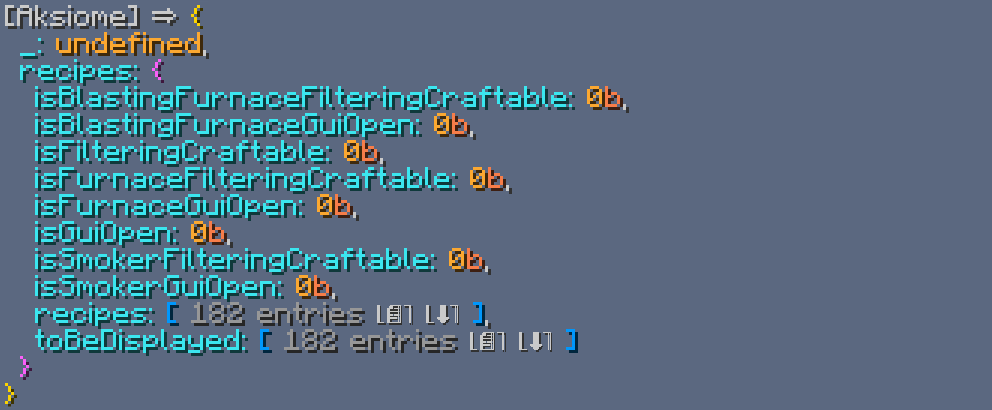
示例:查看一个未定义的分数和玩家配方书(深度为1):
function #bs.dump:var {var: {_: "foo bar", recipes: "entity @s recipeBook 1"}}
重要
由于实现方式和其固有限制,在顶层级需要对值进行转义。
function #bs.dump:var {var: '"storage bs:const"'}
制作人员: Aksiome
💬 这对你有帮助吗?
欢迎在下方留下你的问题和反馈!